
This content has been deprecated. See https://www.tremolosecurity.com/kubernetes/ for updated content
Build an SSO Solution for Kubernetes
After we finished integration for OpenShift into Unison, we wanted to move on to Kubernetes. We knew that the RBAC model in Kubernetes was based off of OpenShift’s so we figured supporting Kubernetes would be pretty straight forward. It turns out we made some false assumptions. The main difference between Kubernetes and OpenShift is that OpenShift has an internal model for storing users and groups in addition to assigning them to roles but Kubernetes has no such internal model. There is no persistent idea of a user or group in Kubernetes. The only way to assign a user or group is to use a tokens file, which needs to be reloaded on each change, or to use SSO to assert a user and groups whenever calling a service. We went the SSO route. We had a couple of key goals:
- Users must be able to login using a web browser to support multiple authentication mechanisms (ie multi-factor, certificates, etc)
- Once logged in, users needed to be able to retrieve their access token for use with the CLI
- The dashboard must be accessible through OpenUnison’s reverse proxy
- OpenUnison will be able to dynamically create workflows based on annotations in kubernetes
- OpenUnison must be able to provision access to resources WITHOUT adding data to Active Directory
We’ll cover 4 & 5 in a future blog.
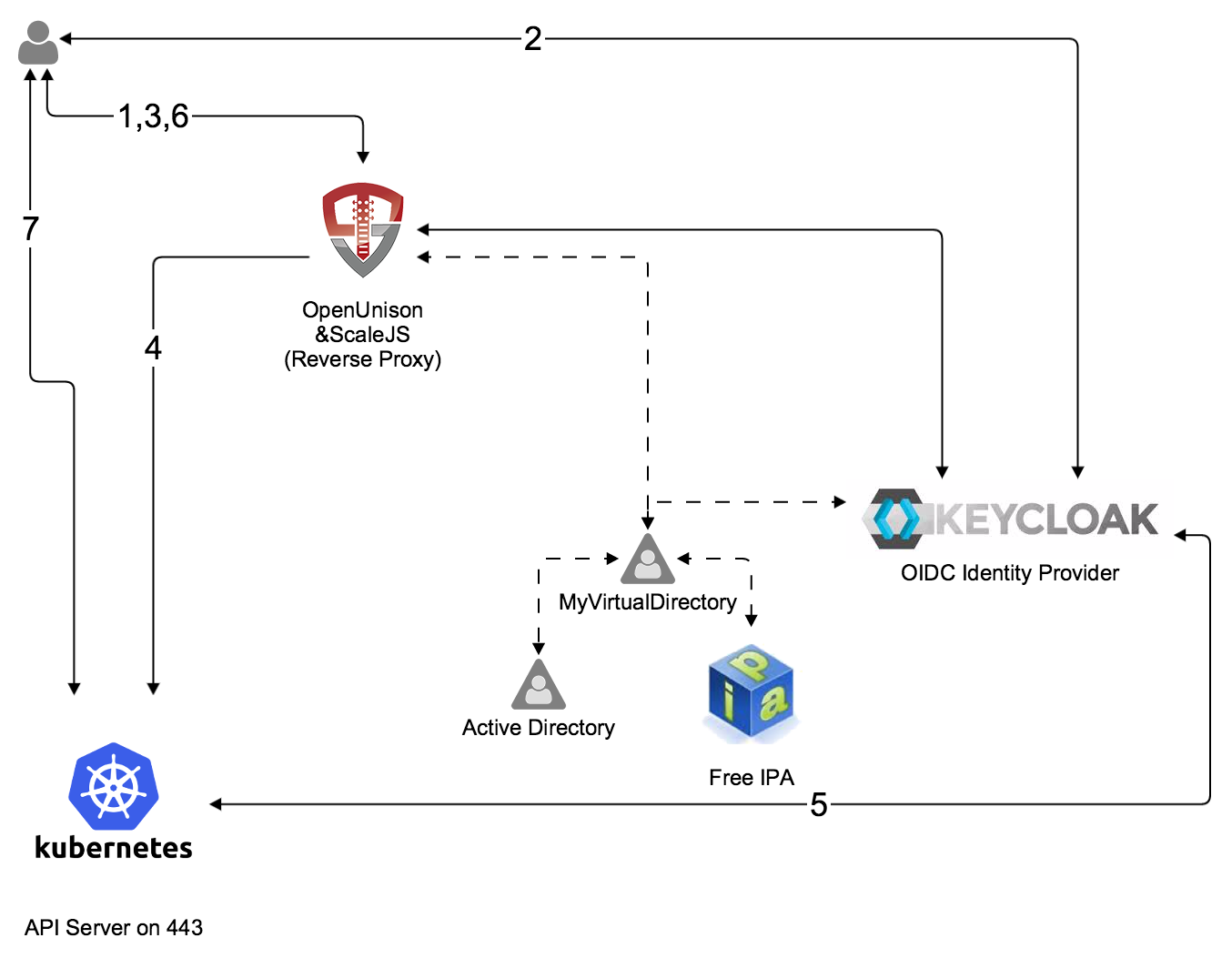
So how does it work?
- First the user will login to OpenUnison and ScaleJS
- OpenUnison will redirect the user to KeyCloak which will authenticate the user against MyVirtualDirectory
- KeyCloak will redirect the user back to OpenUnison with an access token where OpenUnison will retrieve the JWT from KeyCloak and load ScaleJS including a portal link to the Kubernetes dashboard
- When the user clicks on the link their access token is injected into the request to the API server
- The API server validates the request from OpenUnison against KeyCloak and retrieves a JWT with the user’s id and groups
- If the user wishes to use kubectl, the user will click on the link for the OAuth2 Key in ScaleJS
- Finally use that key as the –token with kubectl
Seeing is believing:
Kubernetes Dashboard from Tremolo Security Inc. on Vimeo.
At Red Hat Summit we had a very successful demo around a common enterprise problem: users and their passwords are in Active Directory but getting an administrative account to create groups and add users to them wouldn’t work. So we went with the same model as our OpenShift demo. An ActiveDirectory forest for users, and FreeIPA for groups and additional attributes. The accounts in FreeIPA and Active Directory are joined in real time by MyVirtualDirectory. We could have used OpenUnison’s internal virtual directory to join the two directories, but decided to use an external virtual directory so the same data could be shared between OpenUnison and an OpenID Connect identity provider (IdP). We have written a VERY basic OpenID Connect identity provider for OpenUnison, but it didn’t fulfill enough of the spec to work with Kubernetes so we decided to do our POC with KeyCloak.
Setting Up MyVirtualDirectory
MyVirtualDirectory has many great features. My favorite is its joiner, able to take account attributes from two directories and make them look and act like a single object. No more wrestling with Active Directory admins to add to the schema or create groups or permissions. All we needed was a simple no permissions read-only service account. Since I already had the OpenShift demo’s setup available, I just piggy-backed off of that:
– CODE language-properties –
server.listener.port=10983
#Configure global chains
server.globalChain=
server.nameSpaces=Root,myvdroot,ent2k12-domain-com,ipa.rheldemo.lan,enterprise,enterprise-groups
#Define RootDSE
server.Root.chain=RootDSE
server.Root.nameSpace=
server.Root.weight=0
server.Root.RootDSE.className=net.sourceforge.myvd.inserts.RootDSE
server.Root.RootDSE.config.namingContexts=dc=domain,dc=com|ou=ent2k12-domain-com,o=Data|ou=ipa.rheldemo.lan,o=Data
server.Root.RootDSE.config.supportedControls=2.16.840.1.113730.3.4.18,2.16.840.1.113730.3.4.2,1.3.6.1.4.1.4203.1.10.1,1.2.840.113556.1.4.319,1.2.826.0.1.334810.2.3,1.2.826.0.1.3344810.2.3,1.3.6.1.1.13.2,1.3.6.1.1.13.1,1.3.6.1.1.12
server.Root.RootDSE.config.supportedSaslMechanisms=NONE
server.myvdroot.chain=root
server.myvdroot.nameSpace=dc=domain,dc=com
server.myvdroot.weight=0
server.myvdroot.root.className=net.sourceforge.myvd.inserts.RootObject
server.ent2k12-domain-com.chain=mapobjectguid,objectguid2text,dnmapper,objmap,membertrans,ldap
server.ent2k12-domain-com.nameSpace=ou=ent2k12-domain-com,o=Data
server.ent2k12-domain-com.weight=0
server.ent2k12-domain-com.enabled=true
server.ent2k12-domain-com.mapobjectguid.className=net.sourceforge.myvd.inserts.mapping.AttributeMapper
server.ent2k12-domain-com.mapobjectguid.config.mapping=adObjectGUID=objectGUID,adUid=uid
server.ent2k12-domain-com.objectguid2text.className=com.tremolosecurity.proxy.myvd.inserts.util.UUIDtoText
server.ent2k12-domain-com.objectguid2text.config.attributeName=objectGUID
server.ent2k12-domain-com.dnmapper.className=net.sourceforge.myvd.inserts.mapping.DNAttributeMapper
server.ent2k12-domain-com.dnmapper.config.dnAttribs=member,owner,member,memberOf,distinguishedName,manager
server.ent2k12-domain-com.dnmapper.config.localBase=ou=ent2k12-domain-com,o=Data
server.ent2k12-domain-com.dnmapper.config.urlAttribs=
server.ent2k12-domain-com.objmap.className=net.sourceforge.myvd.inserts.mapping.AttributeValueMapper
server.ent2k12-domain-com.objmap.config.mapping=objectClass.inetOrgPerson=user,objectClass.groupOfNames=group
server.ent2k12-domain-com.membertrans.className=net.sourceforge.myvd.inserts.mapping.AttributeMapper
server.ent2k12-domain-com.membertrans.config.mapping=member=member,uid=samAccountName
server.ent2k12-domain-com.dnmapper.config.remoteBase=cn=Users,dc=ent2k12,dc=domain,dc=com
server.ent2k12-domain-com.ldap.className=net.sourceforge.myvd.inserts.ldap.LDAPInterceptor
server.ent2k12-domain-com.ldap.config.host=w2k12.tremolo.lan
server.ent2k12-domain-com.ldap.config.port=389
server.ent2k12-domain-com.ldap.config.remoteBase=cn=Users,dc=ent2k12,dc=domain,dc=com
server.ent2k12-domain-com.ldap.config.proxyDN=cn=Administrator,cn=Users,dc=ent2k12,dc=domain,dc=com
server.ent2k12-domain-com.ldap.config.proxyPass=xxxxx
server.ent2k12-domain-com.ldap.config.ignoreRefs=true
server.ent2k12-domain-com.ldap.config.passBindOnly=true
server.ent2k12-domain-com.ldap.config.maxIdle=90000
server.ent2k12-domain-com.ldap.config.maxMillis=90000
server.ent2k12-domain-com.ldap.config.maxStaleTimeMillis=90000
server.ent2k12-domain-com.ldap.config.minimumConnections=10
server.ent2k12-domain-com.ldap.config.maximumConnections=10
server.ent2k12-domain-com.ldap.config.usePaging=false
server.ent2k12-domain-com.ldap.config.pageSize=0
server.ent2k12-domain-com.ldap.config.heartbeatIntervalMillis=90000
server.ipa.rheldemo.lan.chain=debugipa,carlicense2adObjectGUID,mapowner,dnmapper,ldap
server.ipa.rheldemo.lan.nameSpace=ou=ipa.rheldemo.lan,o=Data
server.ipa.rheldemo.lan.weight=0
server.ipa.rheldemo.lan.enabled=true
server.ipa.rheldemo.lan.debugipa.className=net.sourceforge.myvd.inserts.DumpTransaction
server.ipa.rheldemo.lan.debugipa.config.logLevel=debug
server.ipa.rheldemo.lan.carlicense2adObjectGUID.className=net.sourceforge.myvd.inserts.mapping.AttributeMapper
server.ipa.rheldemo.lan.carlicense2adObjectGUID.config.mapping=adObjectGUID=carLicense
server.ipa.rheldemo.lan.mapowner.className=net.sourceforge.myvd.inserts.mapping.DNAttributeMapper
server.ipa.rheldemo.lan.mapowner.config.dnAttribs=owner
server.ipa.rheldemo.lan.mapowner.config.localBase=ou=ipa.rheldemo.lan,o=Data
server.ipa.rheldemo.lan.mapowner.config.remoteBase=cn=accounts,dc=rheldemo,dc=lan
server.ipa.rheldemo.lan.dnmapper.className=net.sourceforge.myvd.inserts.mapping.DNAttributeMapper
server.ipa.rheldemo.lan.dnmapper.config.dnAttribs=member,owner,member,memberOf,distinguishedName,manager
server.ipa.rheldemo.lan.dnmapper.config.localBase=ou=ipa.rheldemo.lan,o=Data
server.ipa.rheldemo.lan.dnmapper.config.urlAttribs=memberurl
server.ipa.rheldemo.lan.dnmapper.config.remoteBase=cn=users,cn=accounts,dc=rheldemo,dc=lan
server.ipa.rheldemo.lan.ldap.className=net.sourceforge.myvd.inserts.ldap.LDAPInterceptor
server.ipa.rheldemo.lan.ldap.config.host=ipa.rheldemo.lan
server.ipa.rheldemo.lan.ldap.config.port=389
server.ipa.rheldemo.lan.ldap.config.remoteBase=cn=users,cn=accounts,dc=rheldemo,dc=lan
server.ipa.rheldemo.lan.ldap.config.proxyDN=cn=Directory Manager
server.ipa.rheldemo.lan.ldap.config.proxyPass=xxxxxx
server.ipa.rheldemo.lan.ldap.config.ignoreRefs=true
server.ipa.rheldemo.lan.ldap.config.passBindOnly=true
server.ipa.rheldemo.lan.ldap.config.maxMillis=90000
server.ipa.rheldemo.lan.ldap.config.maxStaleTimeMillis=90000
server.ipa.rheldemo.lan.ldap.config.minimumConnections=10
server.ipa.rheldemo.lan.ldap.config.maximumConnections=10
server.ipa.rheldemo.lan.ldap.config.usePaging=false
server.ipa.rheldemo.lan.ldap.config.pageSize=0
server.ipa.rheldemo.lan.ldap.config.maxIdle=90000
server.ipa.rheldemo.lan.ldap.config.heartbeatIntervalMillis=90000
server.enterprise.chain=cleanSearchAttrs,mapJoinedDNs,mapUSerJoinDNs,joinedOnly,joiner
server.enterprise.nameSpace=ou=enterprise,dc=domain,dc=com
server.enterprise.weight=0
server.enterprise.enabled=true
server.enterprise.cleanSearchAttrs.className=net.sourceforge.myvd.inserts.mapping.AttributeCleaner
server.enterprise.cleanSearchAttrs.config.clearAttributes=true
server.enterprise.mapJoinedDNs.className=net.sourceforge.myvd.inserts.mapping.DNAttributeMapper
server.enterprise.mapJoinedDNs.config.dnAttribs=member,owner
server.enterprise.mapJoinedDNs.config.localBase=ou=enterprise-groups,dc=domain,dc=com
server.enterprise.mapJoinedDNs.config.remoteBase=cn=groups,cn=accounts,dc=rheldemo,dc=lan
server.enterprise.mapUSerJoinDNs.className=net.sourceforge.myvd.inserts.mapping.DNAttributeMapper
server.enterprise.mapUSerJoinDNs.config.dnAttribs=memberOf
server.enterprise.mapUSerJoinDNs.config.localBase=ou=enterprise-groups,dc=domain,dc=com
server.enterprise.mapUSerJoinDNs.config.remoteBase=cn=groups,cn=accounts,dc=rheldemo,dc=lan
server.enterprise.joinedOnly.className=net.sourceforge.myvd.inserts.mapping.EntryFilter
server.enterprise.joinedOnly.config.filter=(joinedDNs=*)
server.enterprise.joinedOnly.config.objectClass=inetOrgPerson
server.enterprise.joiner.className=net.sourceforge.myvd.inserts.join.Joiner
server.enterprise.joiner.config.primaryNamespace=ou=ipa.rheldemo.lan,o=Data
server.enterprise.joiner.config.joinedNamespace=ou=ent2k12-domain-com,o=Data
server.enterprise.joiner.config.joinFilter=(adObjectGUID=ATTR.adObjectGUID)
server.enterprise.joiner.config.joinedAttributes=adObjectGUID,givenName,sn,displayName,adUID,userPrincipalName,mobile
server.enterprise.joiner.config.joinedObjectClasses=inetOrgPerson
server.enterprise.joiner.config.bindPrimaryFirst=false
server.enterprise-groups.chain=mapServiceAccounts,mapmembers,mapmember,dnmapper,ldap
server.enterprise-groups.nameSpace=ou=enterprise-groups,dc=domain,dc=com
server.enterprise-groups.weight=0
server.enterprise-groups.enabled=true
server.enterprise-groups.mapServiceAccounts.className=net.sourceforge.myvd.inserts.mapping.DNAttributeMapper
server.enterprise-groups.mapServiceAccounts.config.dnAttribs=member
server.enterprise-groups.mapServiceAccounts.config.localBase=ou=enterprise-serviceaccounts,dc=domain,dc=com
server.enterprise-groups.mapServiceAccounts.config.remoteBase=ou=ipa.rheldemo.lan,o=Data
server.enterprise-groups.mapmembers.className=net.sourceforge.myvd.inserts.join.JoinSearchMapDNAttribute
server.enterprise-groups.mapmembers.config.out2inSearchRoot=ou=ipa.rheldemo.lan,o=Data
server.enterprise-groups.mapmembers.config.dnAttributes=member
server.enterprise-groups.mapmembers.config.in2outSearchRoot=dc=domain,dc=com
server.enterprise-groups.mapmembers.config.searchFilter=(adObjectGUID=#)
server.enterprise-groups.mapmembers.config.joinAttribute=adObjectGUID
server.enterprise-groups.mapmember.className=net.sourceforge.myvd.inserts.mapping.DNAttributeMapper
server.enterprise-groups.mapmember.config.dnAttribs=member
server.enterprise-groups.mapmember.config.localBase=ou=ipa.rheldemo.lan,o=Data
server.enterprise-groups.mapmember.config.remoteBase=cn=users,cn=accounts,dc=rheldemo,dc=lan
server.enterprise-groups.dnmapper.className=net.sourceforge.myvd.inserts.mapping.DNAttributeMapper
server.enterprise-groups.dnmapper.config.dnAttribs=member,owner,member,memberOf,distinguishedName,manager
server.enterprise-groups.dnmapper.config.localBase=ou=enterprise-groups,dc=domain,dc=com
server.enterprise-groups.dnmapper.config.urlAttribs=memberurl
server.enterprise-groups.dnmapper.config.remoteBase=cn=groups,cn=accounts,dc=rheldemo,dc=lan
server.enterprise-groups.ldap.className=net.sourceforge.myvd.inserts.ldap.LDAPInterceptor
server.enterprise-groups.ldap.config.host=ipa.rheldemo.lan
server.enterprise-groups.ldap.config.port=389
server.enterprise-groups.ldap.config.remoteBase=cn=groups,cn=accounts,dc=rheldemo,dc=lan
server.enterprise-groups.ldap.config.proxyDN=cn=Directory Manager
server.enterprise-groups.ldap.config.proxyPass=xxxxx
server.enterprise-groups.ldap.config.ignoreRefs=true
server.enterprise-groups.ldap.config.passBindOnly=true
server.enterprise-groups.ldap.config.maxMillis=90000
server.enterprise-groups.ldap.config.maxStaleTimeMillis=90000
server.enterprise-groups.ldap.config.minimumConnections=10
server.enterprise-groups.ldap.config.maximumConnections=10
server.enterprise-groups.ldap.config.usePaging=false
server.enterprise-groups.ldap.config.pageSize=0
server.enterprise-groups.ldap.config.maxIdle=90000
server.enterprise-groups.ldap.config.heartbeatIntervalMillis=90000
The first two namespaces are to connect to FreeIPA and Active Directory respectively and then next create the join. Since we wanted to re-use our FreeIPA groups I added another block to properly map those. So if someone looks at this directory in a directory browser, it’ll look just like a normal ldap directory. You would never know that the attributes were coming from two different directories.
Deploying KeyCloak
This part was hard, i mean really hard, i mean crazy hard. It took about 5 minutes. I downloaded the latest from the website (2.1?) got it up and running and created a realm for kubernetes (that was about 2 minutes). Then I added an LDAP Federation with my virtual directory (another minute). Then I added a custom claim to represent the groups we’re sending to kubernetes (another minute). Finally, I setup a client for OpenUnison.
The only “trick” I ran into had nothing to do with KC. Kubernetes will ONLY talk over TLS when doing OpenID Connect, so I setup a self signed certificate in Wildfly. It turns out Kubernetes won’t work with a certificate that signs its self, only with a certificate thats signed by a CA (doesn’t need to be a commercial CA, just a CA). The CA its self can be self signed and explicitly trusted by Kubernetes. This is an issue with Golang’s TLS implementation, as seen in this ticket on GitHub. So I used the script that was referenced in the ticket to create a CA and cert, imported them into a java keystore by first converting them to PKCS12 and we were good to go.
Deploying Kubernetes
This was the single hardest part of this endeavor. Not because Kubernetes is so hard to deploy but because all of the “distros” were either VERY hard to customize or impossible to. In order to configure Kubernetes’ OIDC support you need to add parameters to the startup of the API server but most of the quick starts and distros hid this in a pre-built binary or docker image. I made some progress with kube-deploy’s multi node docker project but that was still very hard to work with (for details, see the issue I opened). Special thanks to Eric Chiang from CoreOS for pointing me to their single node vagrant image. Fit the bill perfectly. I was able to edit a YAML file, restart docker and we were good to go.
Deploying OpenUnison
OK, so for the main event. First thing I needed to do was get SSO working with KeyCloak. We had already built an OpenID Connect authentication mechanism so that took a couple of minutes to get working. Once we had SSO we wanted to use ScaleJS to give users an access portal where they could view their token and request access for roles in Kubernetes once we got to the identity management portion of the program. We also wanted an easy way to get access to the Kubernetes dashboard. First we deployed ScaleJS’ main application which is the primary interface for access requests, links, reports, approvals, etc. Since we had our identity repository in an external virtual directory and sso with KeyCloak this was very easy.
Next we needed to setup ScaleJS Token. This is an application that runs in OpenUnison meant for getting tokens to users. Its got a plugin model for different token types and since the OpenID Connect authentication mechanism stores the token in the session I created a new plugin to retrieve that token. I then added a portal URL and the image of a key so users could retrieve the token for use in kubectl.
At this point we were able to login to KeyCloak, get the token and use it to access kubectl. Now we needed to integrate the Kubernetes dashboard. This was pretty easy. I setup a URL in OpenUnison pointing to the API server running on 443. I needed a way to send the user’s access token to Kubernetes so I created a custom response that would create a string with the word “bearer” and a space in front of the access token and then created a response group creating an Authorization header using the custom response. Worked perfectly. Finally, I created a URL for the dashboard with the Kubernetes logo.
Here’s the OpenUnison configuration:
– CODE languge-xml –
<tremoloConfig xmlns=”http://www.tremolosecurity.com/tremoloConfig” xmlns:xsi=”http://www.w3.org/2001/XMLSchema-instance” xsi:schemaLocation=”http://www.tremolosecurity.com/tremoloConfig tremoloConfig.xsd” ldapRoot=”dc=domain,dc=com” groupObjectClass=”groupOfNames” groupMemberAttribute=”member” userObjectClass=”inetOrgPerson”>
<!– The regex attribute defines if the proxyTo tag should be interpreted with a regex or not –>
<!– The authChain attribute should be the name of an authChain –>
<!– The regex attribute defines if the proxyTo tag should be interpreted with a regex or not –>
<!– The authChain attribute should be the name of an authChain –>
<!– Any number of host tags may be specified to allow for an application to work on multiple hosts. Additionally an asterick (*) can be specified to make this URL available for ALL hosts –>
<!– The filterChain allows for transformations of the request such as manipulating attributes and injecting headers –>
<!– The path of the logout URI –>
<!– The title to show on the home page –>
<!– Sub text for the home page –>
<!– Determines if a user can be edited –>
<!– The name of the workflow to run when a user submits an update request –>
<!– When the below number of minutes are left in the user’s session, warn the user –>
<!– For each attribute, define an attributeNames, displayName, readOnly –>
<!– The name of the attribute that identifies the user uniquely –>
<!– An attribute that specifies which roles a user is a member of. If left blank, then the user’s DN in the virtual directory is compared against memberOf attributes –>
<!– List of attributes to include in the approval screen –>
<!– Labels for each of the attributes –>
<!– If set to true, the organization tree is shown on the main page, helpful when there are numerous links to organize them by organization –>
<!– The URL to redirect the user to when they logout –>
<!– Optional class that can make dynamic decisions about editing the user’s profile, must implement com.tremolosecurity.scalejs.sdk.UiDecisions –>
<!– The title to show on the home page –>
<!– Sub text for the home page –>
<!– The URL to redirect the user to when they logout –>
<!– The URL to access ScaleMain –>
<!– Implementation of the token loader –>
<!– Token specific parameters (see below) –>
Whats Next?
With SSO working great, the next step is to enable Kubernetes’ RBAC model and design a management process around the groups. Once that model is complete, I can create a dynamic workflow and let users login, request access to Kubernetes resources and let approvers approve that access (plus the usual reports). Since OpenShift uses the same service account concept as Kubernetes, I think I can use our OpenShift target to be able to pull the annotations our of each namespace (or role, or whatever we build our dynamic workflow on). Then we’ll have a complete open source identity management solution for Kubernetes.
Thank You
I’d like to say I was smart enough to figure this all out on my own, but anyone who knows me would know thats a lie! I’d like to thank @ericchiang, @DevoperandI and @whitlockjc on the kubernetes/sig-auth slack channel for helping me out and helping get through some key concepts.
Links
DevOperandi’s integration of KeyCloak and Kubernetes – http://www.devoperandi.com/kubernetes-authentication-openid-connect/
OpenUnison’s OpenID Connect Client – https://github.com/TremoloSecurity/OpenIDConnect/tree/1.0.7
KeyCloak – http://www.keycloak.org/
CoreOS Single Node Kubernetes Vagrant Image – https://coreos.com/kubernetes/docs/latest/kubernetes-on-vagrant-single.html